What Is PDF Metadata? How to View and Edit It
By Bishal Neupane · · 2 min read
Every PDF carries a small set of properties that you don't see on the page: its metadata. It decides what appears in a browser tab, how the file shows up in search results, and sometimes whose name is attached to it.
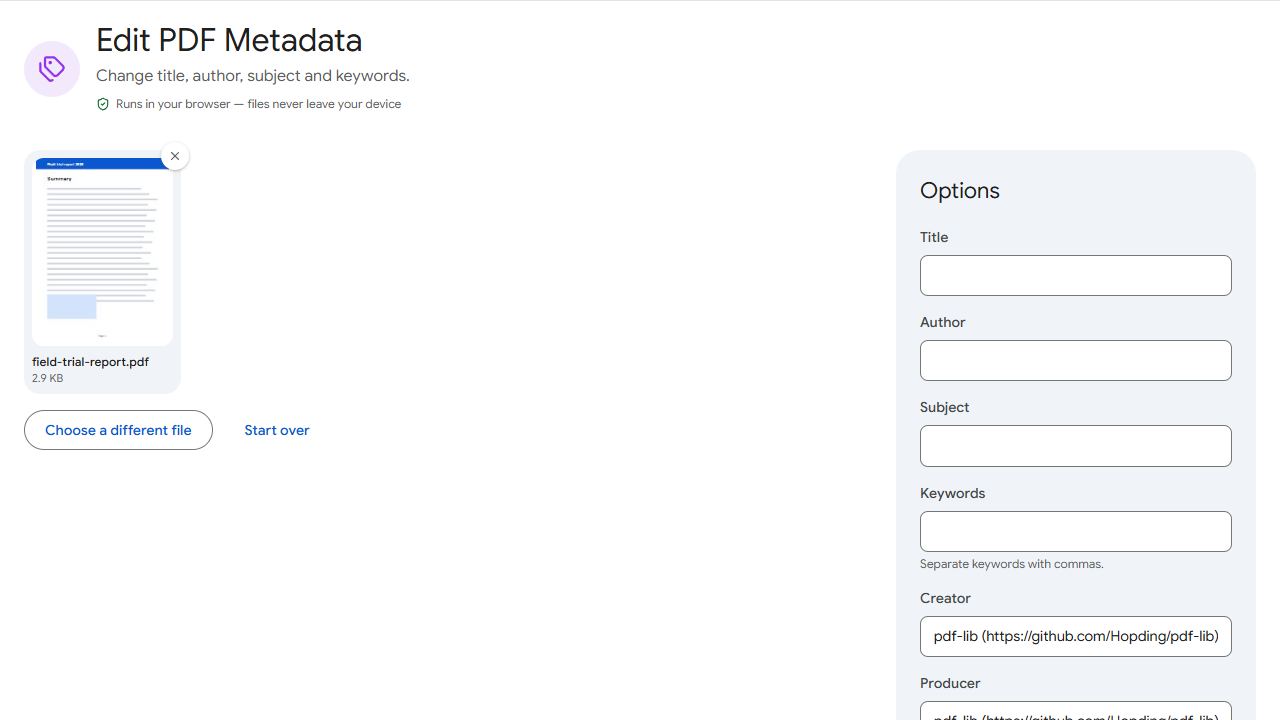
The main fields
- Title — shown in the browser tab and in the title bar of many PDF viewers, and often used by search engines as the result title.
- Author — usually filled in automatically from the name on the computer that created the file.
- Subject and Keywords — short descriptions that help document search.
- Creator and Producer — the programs used to make the PDF.
Why it's worth checking
- Privacy: the Author field can reveal a person's full name, or the name of an old template's creator, on a document you publish.
- Professionalism: a browser tab reading "Microsoft Word - final_v7_REAL" doesn't look good.
- Search: PDFs on your website can appear in Google. A clear title helps people click.
How to edit it
- Open Edit Metadata and add the PDF. The current values are filled in for you.
- Change the title, author, subject or keywords. Clear a field to remove it.
- Click Save metadata and download.
Publishing a document? Remove reviewers' notes as well with Remove Annotations.
Common problems and fixes
- The browser tab still shows the file name.
- Some viewers show the file name unless the Title field is set. Add a Title and save.
- The Author field keeps coming back.
- Your writing app adds it again each time you export. Change the author name in that app's settings, or edit the metadata after exporting.
- Search results show an old title.
- Search engines update their copy when they recrawl your file, which can take days or weeks.
- I can't see the metadata.
- In most PDF viewers, open File → Properties (or Document Properties).
Frequently asked questions
No. Metadata is stored separately from the page content.
It's a good habit for documents you publish or send outside your organisation, especially the Author field.
A clear, descriptive Title can help people recognise your document in search results. Good content matters far more.
Yes. Edit Metadata works in mobile browsers.