How to Add Page Numbers to a Project Report or Thesis
By Bishal Neupane · · 2 min read
University guidelines are strict about page numbers in project reports and theses, and examiners notice when they're wrong. If your chapters live in separate files, or numbering in your word processor went wrong, you can fix it on the finished PDF.
The usual rules
- The cover and title page carry no number.
- Preliminary pages (declaration, acknowledgements, abstract, contents) are often numbered i, ii, iii …
- The main text starts at 1 on the first page of Chapter 1.
- Your university's format guide has the final word, so check it before you print.
Merge the chapters first
If chapters were written in separate files, combine them with Merge PDF before numbering. Numbering the final file in one go keeps the sequence unbroken.
Number from Chapter 1
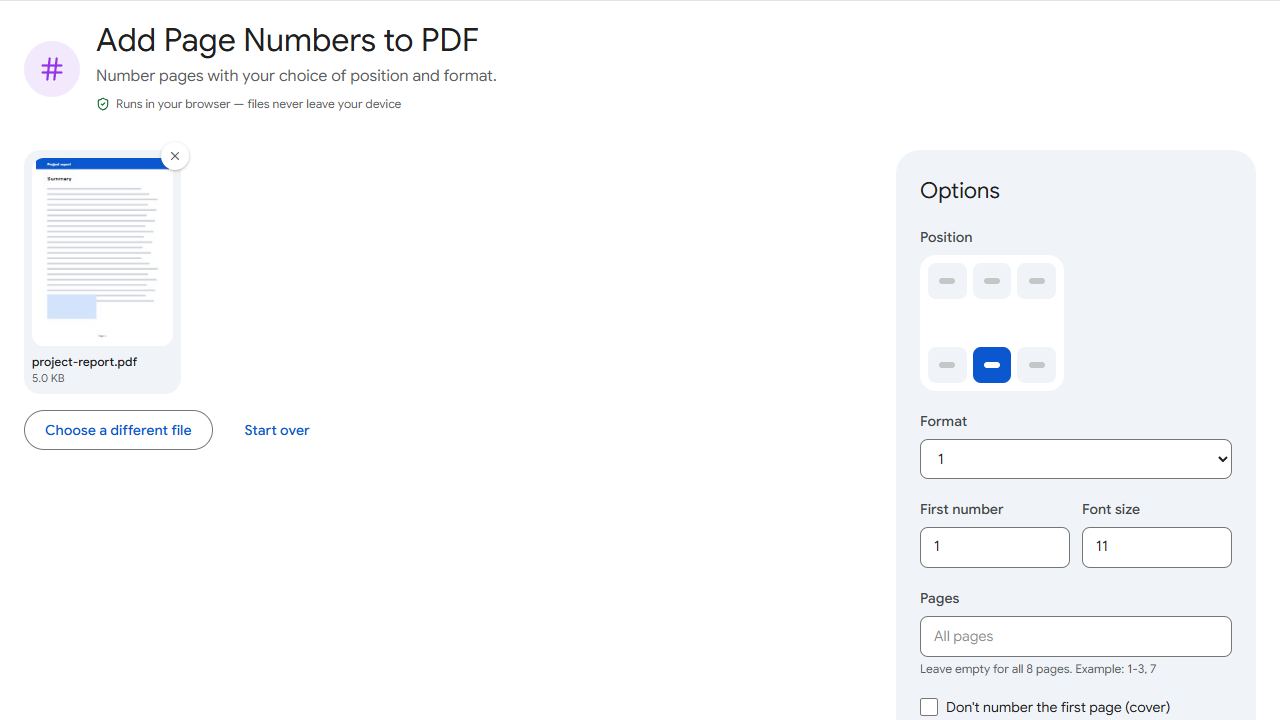
- Open Page Numbers and add the finished report.
- In Pages, enter the range for the main text, for example
9-64if Chapter 1 starts on page 9 of the PDF. - Set First number to 1, pick a position (bottom centre is the usual choice) and a format.
- Click Add page numbers and download.
Page 9 of the file now shows 1, and the preliminary pages stay unnumbered.
Roman numerals and running headers
Page Numbers uses ordinary numbers. If your guidelines require i, ii, iii on the preliminary pages, add those in your word processor before exporting, or leave them unnumbered if that's allowed.
For a running header with the report title or your name, use Header & Footer. It can also show "Page 3 of 64".
Common problems and fixes
- Numbering starts at the wrong number.
- Check First number and the Pages range. The first page in the range gets the first number.
- The number overlaps footer text.
- Choose another position, reduce the font size, or number from your word processor so it can make room.
- The cover page got numbered.
- Tick Don't number the first page (cover), or start the Pages range after the preliminary pages.
- I added pages later and the numbers are wrong.
- Number the original, unnumbered file again after making changes, rather than numbering an already-numbered copy.
Frequently asked questions
Not in Page Numbers. Add roman numerals to preliminary pages in your word processor before exporting.
Yes. Choose that format in Page Numbers, or use Header & Footer for more control.
Yes, from 6 to 48 points.
No. Numbering happens in your browser, on your device.