How to Print Multiple PDF Pages on One Sheet
By Bishal Neupane · · 2 min read
Lecture slides, long handouts and proofs rarely need a full sheet of paper per page. Putting several pages on each sheet — called N-up printing — can cut paper use by half or more.
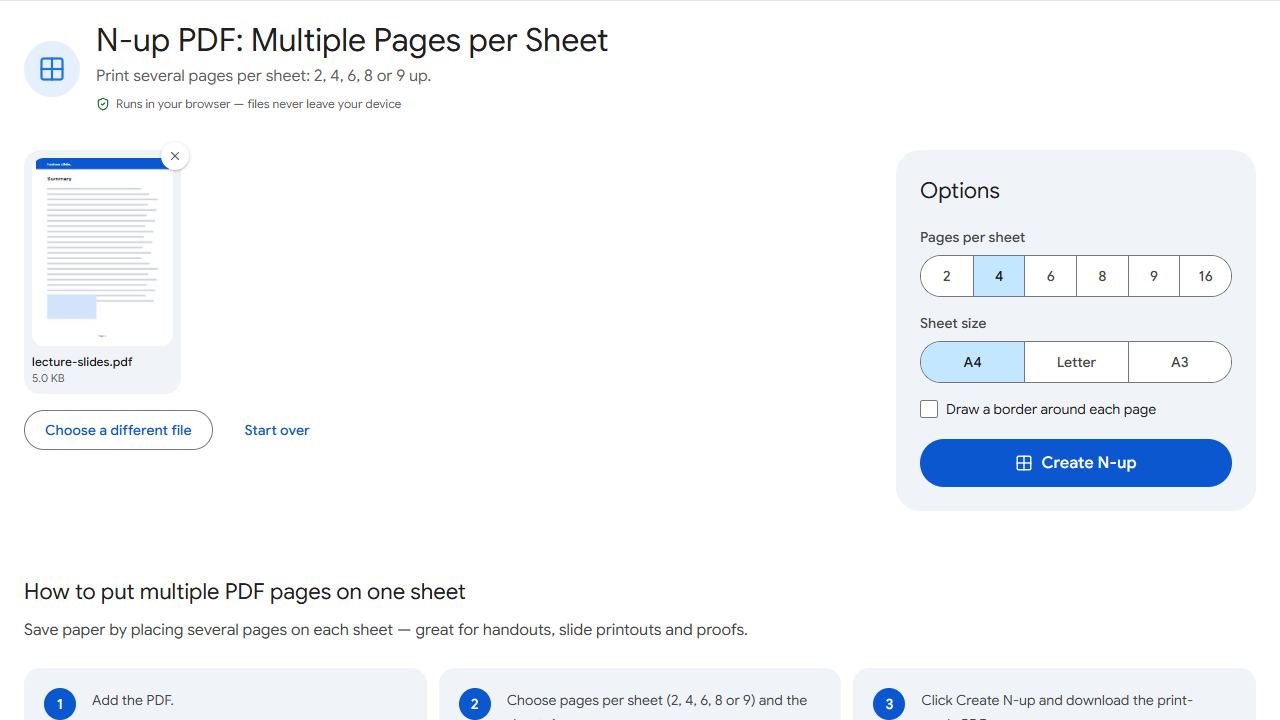
Create an N-up PDF
- Open N-up and add the PDF.
- Choose how many pages per sheet: 2, 4, 6, 8 or 9.
- Choose the sheet size you'll print on.
- Click Create N-up, download, and print the new file normally at 100% scale.
Which layout to choose
- 2 per sheet — comfortable reading for text documents; great for study notes.
- 4 per sheet — lecture slides and presentations stay readable.
- 6 per sheet — handouts with room to scribble notes around small slides.
- 8–9 per sheet — quick overviews and proofreading page layouts; text gets small.
Why not just use the printer setting?
Many print dialogs offer "pages per sheet", but the setting lives on one computer and printer. An N-up PDF is a normal file: you can email it, print it anywhere, send it to a print shop, and it comes out the same every time. Because pages are placed as vectors, text stays sharp.
Tips
- Wide white margins waste space in N-up layouts — trim them first with Crop PDF.
- Mixing A4 and Letter pages? Make them one size with Resize PDF first for a neater grid.
Common problems and fixes
- Text is too small to read.
- Use fewer pages per sheet — 2 or 4 — or trim the margins first with Crop PDF.
- The printout is shrunk again.
- Print the N-up PDF at 100% ("Actual size"), and don't also use the printer's own pages-per-sheet setting.
- Pages appear in a strange order.
- Pages are placed left to right, top to bottom. Reorder the original first with Organize PDF if needed.
- Landscape slides leave big gaps.
- Try a different number of pages per sheet — 2 or 6 often suit wide slides better than 4.
Frequently asked questions
Printing N pages on each sheet of paper — for example, 4-up means four pages per sheet.
Yes. Create the N-up PDF, then choose double-sided printing in your print dialog.
No. Pages are placed as vectors, so text stays sharp — just smaller.
4 or 6 per sheet keeps slides readable while saving paper.